
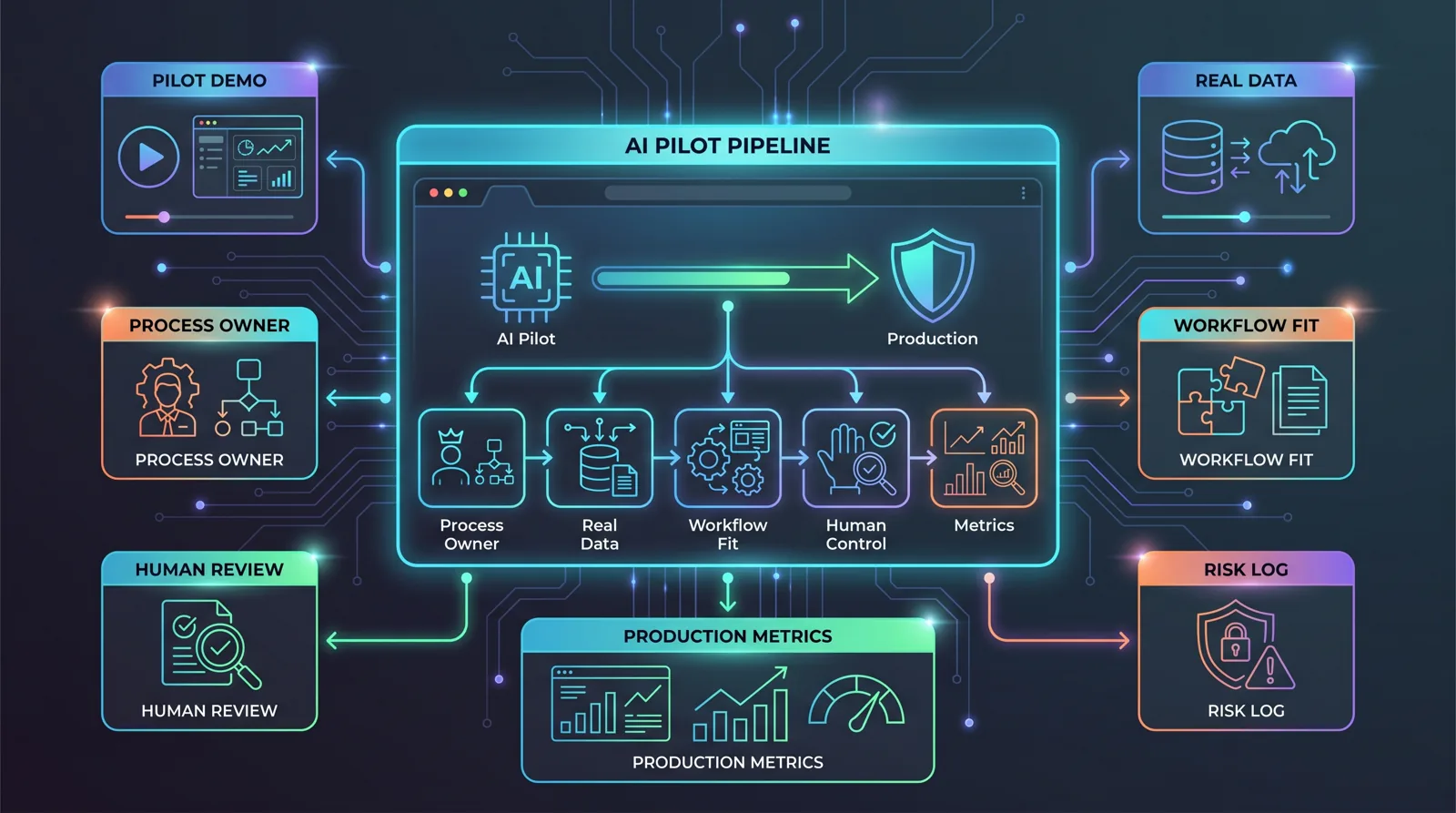
Why AI Pilots Fail Before Production
An AI demo can look good and still fail in the business. A practical framework for process ownership, data, workflow, governance and metrics.

Vít Šafařík
AI & business productivity
An AI pilot often fails only after it already looks successful.
The demo answers correctly. The presentation lands well. The team feels that “we should deploy this.” But a month later, almost nobody uses the tool, people still verify the outputs manually, data has to be copied from spreadsheets, and nobody is sure who should handle exceptions.
That is usually not a model problem. It is an operations problem: unclear ownership, a poorly described process, unreliable data, missing control points and metrics that stop at “the demo looked good”.
If you are considering a serious first AI project, the question is not only “can AI do this?” A better question is: “Do we have a process where AI can be used safely?”
A pilot is not production
A pilot has advantages. You choose clean examples, test on a limited sample and everyone around the project is motivated. Production is less forgiving.
In production, you get incomplete inputs, old documents, customers writing outside the template, commercial exceptions, holidays, CRM changes, missing access rights and the uncomfortable question: who is responsible for the output?
Boston University Questrom summarizes a common scaling problem well: technical pilot success does not equal business impact. AI has to fit into real workflows, with clear decision rights, ongoing monitoring and ownership. Otherwise it remains an interesting experiment.
NIST’s AI Risk Management Framework takes a similar operational view through the functions Govern, Map, Measure and Manage. For a smaller company, that means: do not just connect a model. Know what the system is for, where it can cause harm, how results are measured and who maintains it.
Five things to clarify before development
When I run an AI audit, I do not start with model selection. I start with five more practical questions.
1. Who owns the process
An AI project without a process owner quickly falls between IT, management and operations.
IT can connect systems. A supplier can build the automation. Management can approve the budget. But someone from the business has to define:
- how the process actually works today,
- which exceptions are normal and which are risky,
- what a good output looks like,
- who is allowed to change the rules,
- when AI should hand the case to a human.
Without that person, AI becomes a tool without authority. Users do not trust it, rules change informally and every problem ends with “someone needs to configure that”.
The process owner does not need to be technical. It is often the support lead, operations manager, back-office lead, sales manager or the person who already keeps the process running manually today.
2. What data AI will actually receive
In a demo, you can use a clean export. In production, AI often meets reality:
- different customer names across systems,
- missing CRM fields,
- old documents without a consistent structure,
- spreadsheets with manual notes,
- duplicate records,
- rules that only one person knows.
MIT Project NANDA’s State of AI in Business 2025 report describes the gap between pilots with no measurable impact and systems that work: stronger systems are workflow-specific, integrated into daily work and able to use feedback. That is the opposite of “let’s upload a few files into chat and see what happens”.
For a smaller company, the goal is not to build a perfect data warehouse. The goal is to know which data is reliable enough for the first version and where human review must stay in place.
A practical test: take the last 30–50 real cases from the process and review them manually. How many have complete inputs? How many contain exceptions? How many could AI handle safely? If nobody wants to do this, the project is probably not ready.
3. Where the output fits in the workflow
Many AI pilots end up as one more window next to the actual work. The user has to open a chat, paste data, copy the answer, edit it, paste it into the CRM and hope they did not miss anything.
That is not automation. That is more expensive copy-paste.
A good production solution has a clear place in the process. For example:
- an incoming request arrives by email,
- the automation extracts job type, deadline and risk notes,
- it creates a draft record in the CRM,
- it prepares a response,
- a human approves or corrects exceptions,
- the system stores a log and updates the status.
AI does not have to do everything. It is often enough for it to handle first classification, draft replies, data extraction or a checklist. The important part is that the output does not float outside the workflow.
4. Where the control point is
The higher the cost of an error, the clearer the human control point should be.
For internal lead classification, a weekly review may be enough. For customer replies, a human might approve every message above a certain order value. For legal, financial or HR documents, I would not automate final decisions without explicit human approval.
NIST AI RMF emphasizes that governance should be continuous and connected to mapping, measuring and managing risk. In a small company, this does not require a large committee. It can be a practical set of guardrails:
- what AI may do by itself,
- what it may only suggest,
- when it must escalate,
- what gets logged,
- who reviews mistakes,
- how rules are changed.
Without these guardrails, users usually go in one of two directions: they do not trust the AI and work around it, or they trust it too much and let it make decisions it should not make alone.
5. How we know it works
“We liked the demo” is not a metric.
Before deployment, I would define three to five simple indicators:
- number of cases processed per week,
- time per case before and after deployment,
- share of exceptions escalated to a human,
- number of corrections after AI output,
- impact on response speed, data quality or error rate.
This does not need to be a precise financial ROI model immediately. For a first project, it is often enough to know whether the process became faster, whether people trust the output and where the solution gets stuck.
The key is to measure the same type of cases. If the pilot uses easy inputs and production mostly handles exceptions, the numbers will lie.
A mini-checklist before you build
Before the first investment, I would go through this checklist:
- Does the process have one owner? Not a department, a specific person.
- Do we have real input samples? Not ideal examples, actual cases.
- Do we know which steps AI handles and which stay with humans? Including exceptions.
- Is it clear where the output is stored? CRM, helpdesk, spreadsheet, dashboard, document.
- Is there a control point for risky cases? Approval, escalation or manual review.
- Do we measure the current state? Without a baseline, it is hard to prove value.
- Do we know who maintains the solution after deployment? Rules, prompts, data sources and users.
If two or more answers are “we don’t know”, that is not a reason to abandon AI. It is a signal to start with process discovery, not development.
When to narrow the project
The most common mistake is not a small scope. The most common mistake is a first version that is too broad.
Instead of “let’s automate customer support”, start with one ticket type. Instead of “AI will process all documents”, start with one form or report type. Instead of “we will build a company assistant”, start with answers from one internal knowledge base.
Narrowing the scope is not a lack of ambition. It is how you move AI from a presentation into daily operations without drowning the project in edge cases.
A good first brief might look like this:
AI processes incoming service requests from email, extracts customer, issue type, priority and suggested next step. Low-risk cases are created in the helpdesk as drafts. Cases with missing data or high priority are escalated to the coordinator for approval. Every week we measure case volume, average handling time and corrections.
That is much better than “we want AI for support”.
What a good AI audit should deliver
A good audit should not end with a generic slide deck about AI possibilities. It should produce a decision.
The output should include:
- a prioritized list of processes by work volume, risk and data readiness,
- one or two recommended scenarios for the first version,
- a description of inputs, outputs, control points and systems,
- an implementation scope estimate,
- proposed metrics,
- risks that suggest narrowing or postponing the project.
That audit is useful even if you decide not to build anything immediately. It saves the budget that would otherwise disappear into a nice pilot with no operational owner.
Practical conclusion
AI projects usually do not fail because the model cannot draft a reply or extract data from a document. They fail because the company does not know who owns the process, which data to trust, what should happen with the output and how success will be measured.
Before you pick a tool, review the process. Before you build an internal assistant, find real inputs. Before you promise automation, define the control point.
If you want to find out which process in your company has a real chance of moving from AI demo to production, I would start with a short AI audit. And if you already have a specific workflow in mind, we can look directly at practical implementation.
Share this article
Found this article helpful? Share it with colleagues who might benefit.