
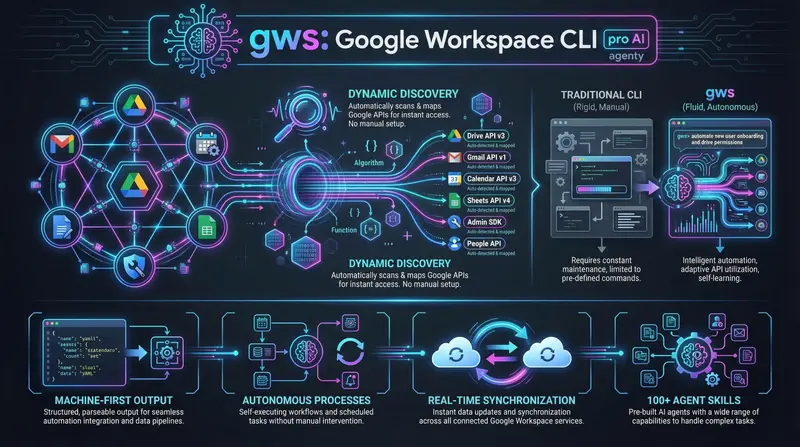
gws: Google Workspace CLI for AI Agents
gws is an open-source CLI for Google Workspace for AI agents. Dynamic Discovery, MCP server and security. How to implement? Book an audit.

Vit Safarik
AI & business productivity
In early March 2026, Google quietly pushed a tool to GitHub that at first glance looks like just another CLI for managing enterprise tools.
Except gws isn’t built for people. It’s built for AI agents – and that’s precisely why it’s worth paying attention to.
What is Google Workspace CLI for AI Agents
gws is an open-source command-line interface for the entire Google Workspace ecosystem:
- Gmail
- Google Drive
- Google Calendar
- Google Sheets
- Google Docs
- Google Chat
- Google Admin
Technical specifications
- Written in Rust
- Distributed via npm
- Apache 2.0 License
- 100+ predefined agent skills
On the surface: one tool instead of five web consoles.
Below the surface: runtime infrastructure for AI agents, where human usage is a side effect.
Designed for machines, not terminals
Google says it directly. The entire design – JSON output, granular permissions, built-in MCP server – makes sense primarily in the context of autonomous agents that need reliable, parsable interfaces to data.
Compare it to GAM (Google Apps Manager), the de facto standard of the last 15 years:
| Tool | Optimization | Output | Usage |
|---|---|---|---|
| GAM | People and shell scripts | For terminal | Manual operations |
| gws | AI agents and LLMs | For machines (JSON first) | Autonomous processes |
gws goes the opposite direction from traditional CLI – output is primarily for machines, the terminal is a bonus.
Dynamic Discovery: A CLI That Updates Itself
This is technically the most interesting decision of the entire project.
The Problem with Traditional CLI
Traditional CLI operates in an old model:
- Developer adds new API endpoint
- Writes handler
- Releases new version
- User updates
Result: slow, manual, prone to falling behind the API.
The Solution: Dynamic Discovery Service
gws reads the Google Discovery Service at runtime – a central catalog of all Google APIs.
Result:
- New Workspace endpoint?
gwsautomatically “knows” it - Without any CLI update
- Without waiting for a new release
- Immediate access to new features
Example:
# This command works even for an endpoint that was created last week
gws gmail:messages.list --userId me --maxResults 10
Impact for AI agents
Developers and AI agents have automatic access to the entire current Workspace API – not just the version that someone hardcoded.
It’s the same principle as when an LLM gets access to live documentation instead of static context.
MCP Server in Practice: Claude Desktop, Gemini CLI, VS Code
Google chose Model Context Protocol (MCP) for integrating AI agents – the same standard behind tool integration in Claude Desktop or Cursor IDE.
How to run the MCP server
gws mcpThat’s it. gws starts an MCP server that exposes Workspace operations as tools available to any MCP-compatible client.
Practical Application with Claude
Add it to claude_desktop_config.json and Claude suddenly can:
- Directly read your Gmail
- Create calendar events
- Search Google Drive
- Read and write Docs and Sheets
- No custom integration, no Zapier, no n8n
Granular Permissions and Security
Each agent gets exactly what it needs:
- Document processing agent → access only to Drive and Docs
- Scheduling agent → sees only Calendar
- Support agent → access to Gmail and Drive
No superuser tokens. Minimal risk.
Protection against attacks:
The --sanitize flag adds a layer of protection against prompt injection via Google Cloud Model Armor. This is critical because an AI agent reading Gmail reads untrusted content – anyone can send you an email designed to manipulate the agent.
Basic Commands and Examples for AI Agents
Installation and Setup
npm install -g @google/gws
gws auth login
Practical Commands
Gmail: last 20 emails as JSON
gws gmail:list --maxResults 20Google Drive: files in root folder
gws drive:listGoogle Calendar: events this week
gws calendar:events --timeMin 2026-03-14T00:00:00Z --timeMax 2026-03-21T00:00:00ZGoogle Sheets: data from a specific sheet
gws sheets:values.get --spreadsheetId SHEET_ID --range "Sheet1!A1:D10"Dry run – check without executing
gws gmail:send --to "colleague@company.com" --subject "Test" --dry-runAdvantages of JSON Output
Structured data enables:
- Direct integration into shell pipelines
- Direct use in Python agents
- Compatibility with LLM agentic frameworks
- Auto-pagination for large datasets
- Manual
nextPageTokenhandling is unnecessary
Why This Is a Paradigm Shift: From People to Agents
For a long time, an unwritten rule applied: write software for people, and if machines want to automate, give them an API.
CLI was always the “human layer” – terminals for admins and developers.
gws reverses this rule. CLI as the primary interface for AI agents, where human use is a side case.
Three Reasons Why This Matters
1. Composability
- CLI commands naturally compose into pipelines
- An AI agent can combine
gmail:list, filtering, andcalendar:eventsin ways that static APIs can’t enable without custom code
2. Zero-cost Automation
gws+ CrewAI or LangChain replaces what Zapier charges monthly for- No vendor lock-in, no no-code limitations
- Full control over logic
- Lower barrier than no-code, higher than clicking in UI
3. Infrastructure Instead of Integration
- Zapier, Make, n8n are integrations – connecting two specific systems
gwsis infrastructure – a layer that exists regardless of which agent uses it- An architectural difference that grows with the number of use cases
Important Note
gws is at v0.15, “not officially supported,” and Google explicitly warns against breaking changes.
It’s not a production enterprise tool. It’s an indicator of direction – and that direction is clear.
A world where AI agents have standardized, secure access to corporate data through an open protocol is not a distant vision. It’s what Google just shipped on GitHub.
How to Get Started Implementing AI Agents in Your Company
Are you interested in how to incorporate AI agents into your product or company architecture that actually work and don’t cause harm?
We have three options for you:
1. Find out the state of your AI stack
Book an AI audit – we’ll find out where it makes sense and where it’s just hype.
2. Check out our services
Want to know what we do? Browse our services – how we work with clients and where we see the biggest opportunities.
3. Describe your project directly
Want to consult on something specific? Get in touch – we’ll respond within 24 hours.
More Articles on AI Automation:
Want to learn more? Go back to our blog – we have more materials on AI agents and automation there.
Share this article
Found this article helpful? Share it with colleagues who might benefit.