
Approve AI Agents from Your Phone via Telegram
Control AI agents without losing oversight: approve outputs with a single tap in Telegram — from your phone, anywhere, no technical knowledge required. Find out how.

Vít Šafařík
AI & business productivity
Radek owns an e-shop selling industrial goods. A year ago, a consultant recommended deploying AI to write product descriptions — thousands of items, each needing copy. Technically, it made sense. But Radek got cold feet: What if it writes something wrong? What if it makes things up? What if it uses a competitor’s pricing?
The result? The AI project ended up in a drawer. Radek keeps paying copywriters.
The problem wasn’t the AI. It was that nobody showed Radek how to stay in control of the agent — without sitting at a computer all day. And that’s exactly what this article is about.
Why AI Agents Need Human Oversight
Every manager I show AI agents to eventually asks the same question: “And who keeps an eye on it?”
A fair concern. An agent is a highly capable assistant — but it’s not your CEO. It can write an article, prepare a proposal, process data. What it can’t reliably assess is context: whether now is the right time to publish, whether the tone fits the situation with a customer, whether the result aligns with your business strategy.
Companies respond to this question in two ways — and both are wrong.
Option A: they don’t deploy the agent at all, afraid of losing control. Option B: they let it run on full autopilot and hope for the best.
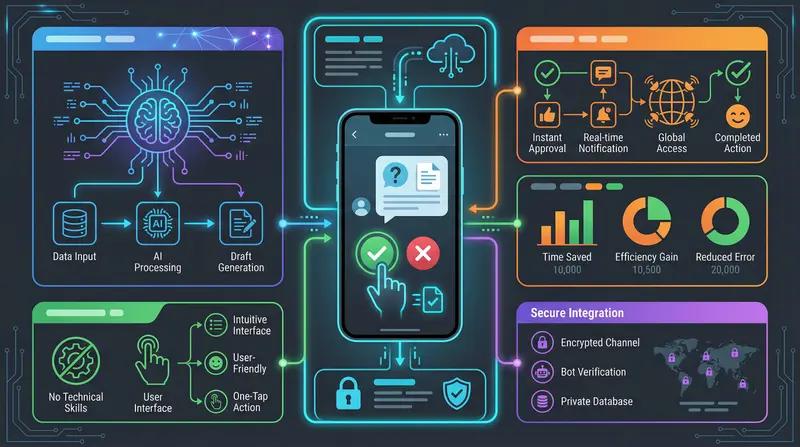
There’s a third way: human-in-the-loop — the agent handles the vast majority of work autonomously, but at key moments it pauses and waits for your approval. Only after you tap “Approve” does it continue. And that approval channel is an app you already have on your phone.
How Telegram Approval Works in Practice
The whole mechanism is surprisingly straightforward. When the agent completes a piece of work that requires your approval, this happens:
- The agent pauses and sends you a message on Telegram — with a preview of the result and two buttons: Approve and Reject
- You get a notification on your phone, just like a message from a friend or colleague
- You tap a button — the entire interaction takes 30 seconds to 2 minutes
- The agent continues (or stops if you rejected)
No terminal. No logging into systems. No technical knowledge. Works from a plane, on holiday, in a meeting — anywhere you have Telegram.
Telegram vs. Email vs. Dashboard: A Comparison
There are three common approaches to giving people control over AI agents:
| Criterion | Telegram | Web Dashboard | |
|---|---|---|---|
| Response speed | Immediate (push notification) | Slow (depends on inbox checks) | You must actively open the page |
| Need to be at a computer | No | Partially | Yes |
| Mobile approval | Native, one tap | Limited | Inconvenient |
| Technical complexity for user | Very low | Low | Medium to high |
| Action history overview | Limited | Medium | Full |
| Suitability for urgent decisions | Excellent | Average | Poor |
Email seems simple, but in practice approving via email means the agent waits for hours — the message gets lost among others, the link leads to a login page, logging in requires a password. A dashboard is a powerful tool for retrospective review, but requires actively opening it, and on mobile it’s inconvenient.
Telegram leads where it matters most: it’s an app people reactively check throughout the day. A notification from the agent behaves just like a message from a colleague.
A Real Example: The Publishing Pipeline at safarik.dev
This website operates on exactly this principle. The entire content creation system is built on a chain of AI agents, with Telegram serving as the single control point.
1. Research — The Researcher agent (haiku model — fast, economical) searches the web, gathers facts and sources on the topic.
2. Proposals — The agent prepares several different angles and sends them to Telegram. I tap to select which approach I want to develop.
3. Writing — The Writer agent (sonnet model — a stronger model for quality text) writes the entire article in Czech, 800–1,500 words, in MDX format ready for the web.
4. SEO optimization — The SEO agent (haiku again) checks headings, meta description, and keywords.
5. Pre-publication approval — Telegram sends a complete article preview. I read it, tap Approve.
6. Publication — The article goes live automatically via git. Without a single terminal command on my part.
7. Translation — The system automatically triggers a translation into English and publishes the English version.
My total active involvement: two taps on my phone, roughly three minutes combined.
What It Costs and What It Saves
The Claude API works on a pay-per-use basis — you pay for the number of tokens processed. The system deliberately uses two different models depending on task complexity: haiku for research, SEO checks, and translation (fast, significantly cheaper), and sonnet for the actual writing (a stronger model, where output quality matters). Exact per-token prices change over time — I recommend checking current rates directly on Anthropic’s website.
A comparison of three approaches to content creation:
| Approach | Your active time | Cost | Delivery speed |
|---|---|---|---|
| External copywriter | Briefing + revisions | Thousands per article | Days |
| In-house editor | Hours of writing | Salary | Hours |
| AI pipeline + Telegram | ~3 minutes | A fraction of the cost | Minutes to hours |
The key saving is less financial than it is in time and attention. Instead of coordinating with a copywriter or spending a morning writing, you get a finished draft in Telegram and make a decision in two minutes.
How to Deploy This in Your Company — First Steps
Telegram as an approval channel for AI agents isn’t the exclusive domain of tech startups. It’s an architectural decision that can be applied to any recurring business process.
Step 1: Identify the right task. Look for processes that repeat regularly, have a predictable output, and where a mistake is unpleasant but not catastrophic. Content creation, report preparation, processing incoming inquiries — ideal candidates.
Step 2: Define the boundary of autonomy. What can the agent do on its own, and what must go through approval? This decision is purely a business one, not a technical one. The agent can autonomously gather data and prepare a draft — but sending it to a customer always goes through your approval.
Step 3: Connect Telegram as the approval channel. The bot is set up once and runs permanently. You then operate the system without any technical knowledge. An overview of the specific solutions we implement this way can be found in the services overview.
Step 4: Run a pilot project. Don’t start with critical processes. Pick one recurring low-risk task, verify the quality of the outputs, and only then expand.
Radek from the opening eventually dusted off his project. We added Telegram approval. Now the agent prepares ten product descriptions, he’s on the train, taps Approve, and gets on with his work. The fear of losing control disappeared — because he never actually lost it.
If you want to know which processes in your company are the best candidates for this approach, start with an AI audit — we’ll map your processes and show you specifically where automation will deliver the greatest return. Or go ahead and schedule a consultation.
Companies waiting for AI to be “mature enough” are meanwhile paying for manual work that their competitors automated long ago.
Share this article
Found this article helpful? Share it with colleagues who might benefit.