
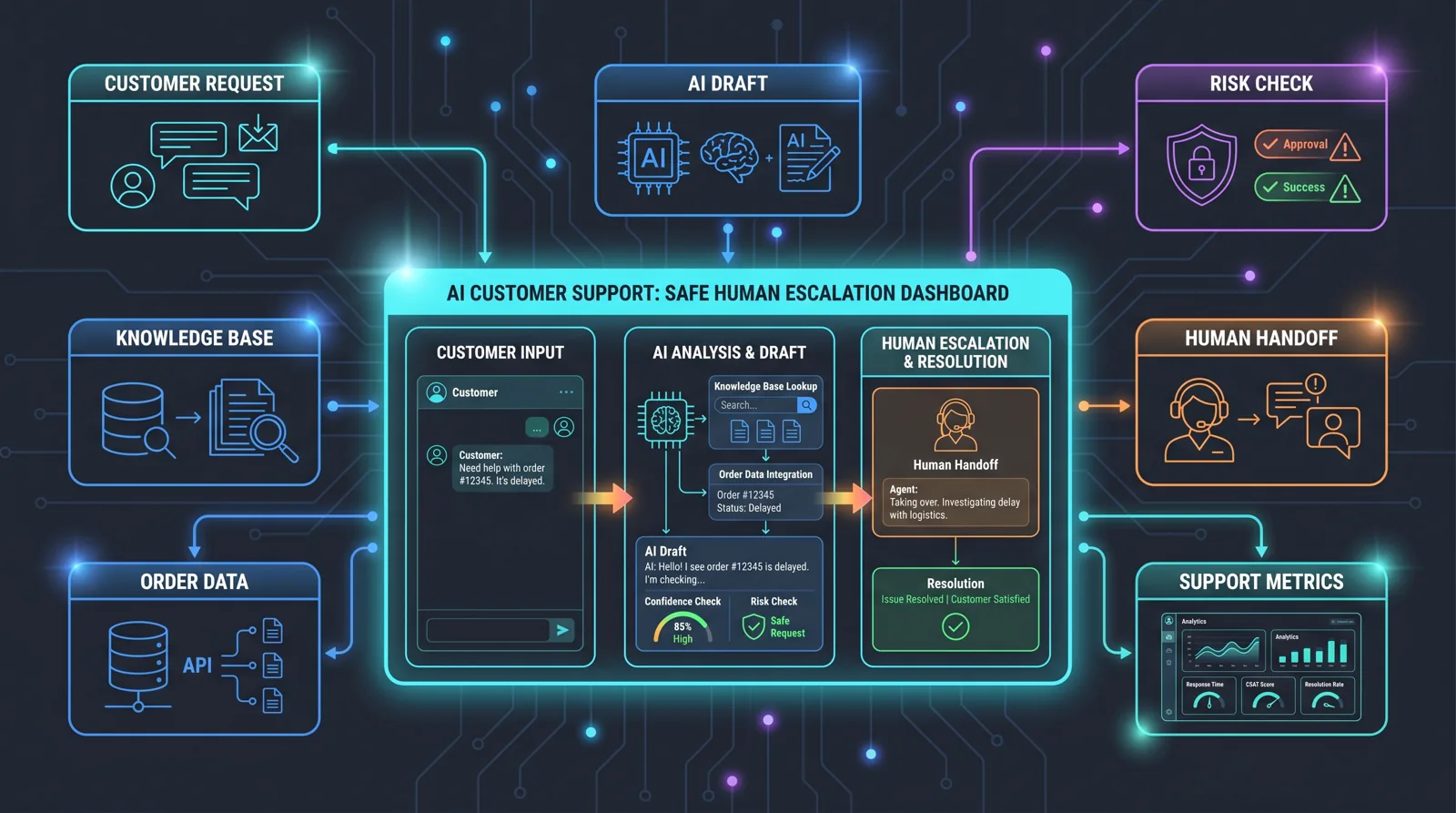
AI Customer Support With Escalation: Not Just a Chatbot
A practical guide to deploying AI support that handles routine work, escalates risky cases to humans, and can be measured.

Vít Šafařík
AI & business productivity
A customer writes on Sunday evening: “Where is my order?” Five minutes later they add a screenshot. Ten minutes after that, they are clearly frustrated. Support will see it in the morning. By then there may be a second ticket, an Instagram message, and a bad review.
This is not simply a “we need a chatbot” problem. It is a disconnected support problem: the answer lives across the e-commerce platform, carrier tracking, billing, claims, internal rules, and people’s heads. AI customer support starts to make sense when it connects that routine into a workflow — and when it knows when to stop answering and hand the case to a human.
Why an FAQ Widget Is Not Enough
The first wave of business chatbots promised cheaper support. In practice, many became nicer FAQ search boxes. They can answer a simple question, but they struggle when a customer needs order status, an exception, a credit note, a complaint process, or sensitive communication.
Zendesk’s CX Trends 2026 focuses heavily on “contextual intelligence”: customers do not want to restart the conversation in every channel, and CX leaders are thinking about memory, multimodal support, transparency, and faster resolutions. For a small or mid-sized company, the practical conclusion is simple: AI support should not be an isolated bot. It should be a layer over existing systems that keeps context and follows company rules.
Intercom points in a similar direction in its article on the AI-first support team. The important lesson is not “replace people.” It is “someone must operationally own AI.” Without ownership, the knowledge base becomes stale, the AI fails on new situations, and performance gradually drifts. That matches support reality: products, pricing, shipping partners, and internal rules change constantly.
The Right Goal: Less Routine, Not Less Responsibility
A good AI support brief does not say “we want a chatbot.” A better brief says:
- reduce first-response time for repetitive requests,
- automatically resolve cases where data and rules are clear,
- escalate risky cases to humans with full context,
- measure where AI helps and where it hurts,
- prevent AI from inventing answers outside trusted sources.
The last point matters. IBM’s documentation on hallucination risk explains that generative AI can produce factually incorrect or ungrounded content. In customer support, this is not an academic issue. A wrong answer about returns, pricing, availability, or complaint rights can cost money and reputation.
An Architecture That Works in Practice
For a smaller company, I would not start with a large “AI contact center” project. I would start with four layers.
1. A Knowledge Base Built for AI
AI needs reliable sources: FAQ, terms, return policies, complaint procedures, internal playbooks, response templates, shipping information, product details, and exceptions. Uploading an old PDF and hoping for the best is not a strategy.
In practice, knowledge needs to be broken into short, current, unambiguous pieces. Every piece should have an owner and a review rhythm. If the returns policy changes, the AI source must change as well. Otherwise the system will confidently repeat yesterday’s truth.
2. Integration With Internal Data
The real value of support often is not the generated text. It is the action: checking order status, finding a payment, verifying stock, opening a complaint, creating a return label, or preparing a draft credit note.
This is where AI either saves time or becomes another toy. A bot without integrations says “please contact support.” An AI layer connected to the order system can say: “Your order is with the carrier, the latest status is yesterday at 18:42, expected delivery is tomorrow.” If rules allow it, it can also offer the next step.
3. Escalation With Context
Escalation is not failure. It is a safety mechanism. AI should hand cases to humans when they are sensitive, expensive, unclear, or outside policy. Typical triggers include:
- an unhappy customer and a potential reputation issue,
- a complaint with legal or financial impact,
- uncertain customer identity,
- low answer confidence,
- a request for an exception,
- a VIP customer or B2B account.
The handoff must not be “please wait for an agent.” The human agent should receive a conversation summary, identified issue, relevant order data, a proposed answer, and the reason for escalation. This saves time while keeping responsibility with a person.
4. Dashboard and Operating Rhythm
AI support is not a one-off deployment. It needs a dashboard and regular review. I would track:
- how many requests AI resolved without human intervention,
- where it escalates most often,
- which answers customers rate poorly,
- what knowledge is missing,
- how much support time it saved,
- what actions AI performed in business systems.
This is where an “AI experiment” becomes an operational tool. Every week, the team can fix knowledge gaps, add new integration actions, and tighten escalation rules.
Example Rollout for an E-commerce or Service Business
The first version should be narrow. For example: order status, returns, and complaints. The goal is not to cover every possible request. The goal is to safely handle a meaningful part of the routine.
A practical rollout could look like this:
- Review the last 300–1,000 tickets and classify them by request type.
- Select categories with clear rules and accessible data.
- Prepare the knowledge base and a test set of real customer questions.
- Connect AI to the helpdesk and order system in read-only mode first.
- Let AI draft replies for human agents before it answers customers directly.
- After review, automate only selected scenarios.
- Add escalation, reporting, and weekly review.
This is slower than “turn on a chatbot,” but it reduces risk substantially. The company validates quality on real data, and the support team learns where AI is useful and where it needs boundaries.
When Not to Deploy AI Support Yet
AI is a poor fit when the company does not have basic process clarity. If terms and exceptions change depending on who answers the ticket, AI will only accelerate the chaos. It also makes little sense when the required data is not available through APIs, exports, or databases and everything must be found manually in emails.
Be careful in areas where every case requires legal judgment, medical advice, or sensitive financial decisions. AI can help with preparation, summaries, and routing, but a human should approve the final response.
What I Would Check in an AI Support Audit
Before implementation, a short audit is worth it. Not a model workshop — a practical review of the process:
- Which request types repeat most often?
- Which of them have clear rules?
- Where does support lose the most time today?
- Which data is available through API, export, or database access?
- Which answers must AI never invent?
- Who will own the knowledge base and review cycle?
- How will we know whether the deployment saves or earns money?
If the answers are solid, a first version of AI support can be built in weeks, not quarters. It does not have to replace the helpdesk. It is enough if it removes routine work, speeds up responses, and hands better-prepared cases to humans.
If your support volume is growing faster than your team, I would start with an AI audit. We review real tickets, systems, and risks first — then decide what AI should automate, what should stay with humans, and how to measure the result.
Share this article
Found this article helpful? Share it with colleagues who might benefit.